Automation Platform > Overview
Automation Platform overview
Start with Warp Factories, or use the Automation Platform's shared execution, configuration, and APIs for standalone cloud agents.
Warp Factories and standalone cloud agents run on the Automation Platform. It provides the execution, configuration, and APIs they share.
Start with a factory
Section titled “Start with a factory”For a team workflow with planning, implementation, and review, start with the Warp Factories quickstart. Then configure its agents, automations, and tools.
Already using the Oz web app, Oz CLI, or SDKs? Use transitioning from Oz to assess that workflow. The cloud agents overview retains standalone setup and management entry points.
How a run works
Section titled “How a run works”A trigger starts work: a schedule, a message in a connected tool, or a request from the app, CLI, or API. Its context tells the agent what to investigate or change, such as an issue description, pull request diff, or failed-build logs.
The agent executes on its configured host using the available repositories, tools, and credentials. A run records its progress and produces results such as a pull request, report, or transcript. For example, send failed-build logs with a request for the agent to investigate and propose a fix for review. See how Warp Factories work for the factory task lifecycle and human review points.
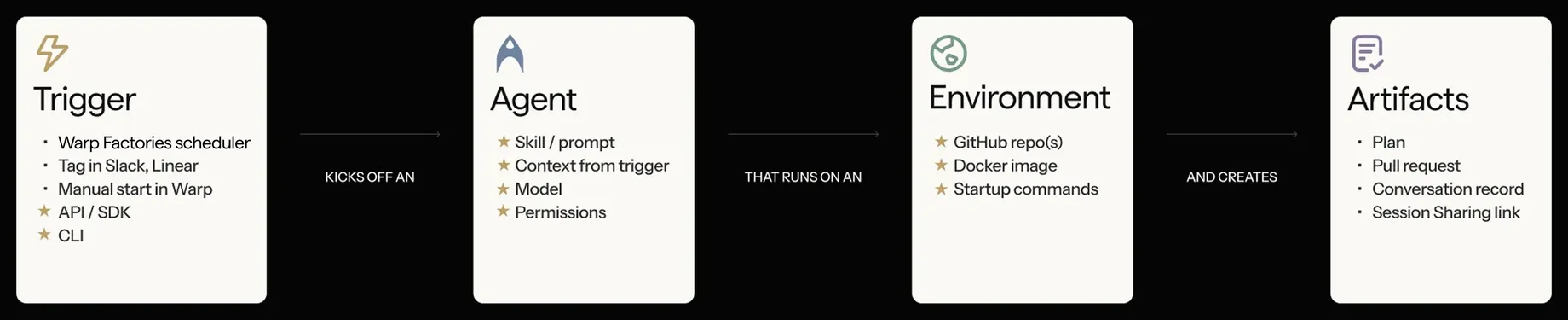
The diagram illustrates an environment-backed run. Factories manage workspace setup by default; selecting a separate existing environment is optional.
Integrations and triggers
Section titled “Integrations and triggers”Integrations supply work and context from tools your team already uses. For example, a message or issue can become a task for an agent. Factory automations route those events from connected tools to factory agents, or start recurring work on a schedule. For custom intake, use webhooks and factory endpoints.
Standalone workflows have separate integrations and scheduled runs. The CLI integration setup guide covers their configuration.
Inspecting results
Section titled “Inspecting results”Run records let you see what the agent attempted, inspect its transcript and outputs, and decide whether the result needs more work. Inspect factory tasks from the factory dashboard. For standalone management, sharing, and steering, use the cloud-agent inspection paths.
Environments
Section titled “Environments”An environment groups a container image, repositories, and setup commands, such as installing the dependencies an agent needs to run tests. Reusing that setup gives recurring tasks a configured toolchain rather than requiring each task to recreate it.
Factories manage their workspace by default, so selecting an existing environment is optional. See Environments for factory agents for that option and standalone setup, and runners for compute configuration.
A host is where the agent executes commands and accesses its workspace. Warp-hosted execution uses compute provisioned by Warp. Managed self-hosting uses a worker on your infrastructure, where your team manages capacity and network access.
For factory hosting choices and requirements, compare Warp-hosted execution with managed self-hosting. Unmanaged execution covers standalone CLI workflows in an existing checkout or CI runner you operate.
The CLI
Section titled “The CLI”The CLI lets you work from a terminal or incorporate agents into scripts and CI without requiring the Warp desktop app. Use the Oz CLI for existing oz workflows and the Warp Agent CLI for warp commands. Check the owning reference before changing a script.
API and SDKs
Section titled “API and SDKs”The API and SDKs let an internal service submit work and inspect results programmatically. Use factory endpoints to send work to a factory, and agent and run endpoints for standalone runs and run inspection. Developer tools links to the SDKs and full API reference.
Secrets
Section titled “Secrets”Secrets give agents credentials for resources such as package registries, APIs, or databases. Grant only the access needed for the task. Use factory secrets for credentials granted to factory agents and harness authentication for third-party provider credentials. The legacy secrets reference preserves standalone CLI and personal-secret workflows.
Shared configuration
Section titled “Shared configuration”Configuration determines which agent runs, which tools it can use, and what setup its work needs. A harness runs the coding agent; MCP servers connect it to external tools and data. Factory-wide and per-agent settings live in the factory definition. The shared harness, environment, and MCP-server references explain factory and standalone configuration separately.
For instructions and reusable context, see factory skills, Rules, saved prompts, and environment variables. These have different scopes; follow the relevant reference.
Measuring factory work
Section titled “Measuring factory work”Use Scorers, Benchmarks, and Self-improvement to evaluate factory work and propose changes to its configuration. See measure and improve for metric definitions and limitations.
Related pages
Section titled “Related pages”- Warp Factories quickstart - Create a factory and send its first work item
- Cloud agents overview - Find supported standalone entry points
- Architecture - Review the run lifecycle and data boundaries
- Multi-agent orchestration - Coordinate parent and child agents